
Veew + HubSpot
HubSpot proposal software that writes from the deal.
Your deal already knows the company, the contacts, and the number. Veew turns it into a personalized, on-brand HubSpot proposal or sales deck, and writes the engagement back to the deal.
Deal in, document out
From HubSpot deal to sent proposal in minutes.
- Company
- Northwind Logistics
- Contact
- Dana Whitfield, VP Operations
- Amount
- $48,000 · 120 seats
- Stage
- Proposal
Pick the deal
Search any HubSpot deal: company, contacts, amount, and stage come with it. Nothing re-typed.
AI writes for the prospect
The narrative is built from the deal and your discovery notes, laid out in your brand, citing your approved proof.
Engagement flows back
Sends and acceptances land on the deal timeline, and views and status on the deal's Veew properties, so the team sees buyer interest where they already work.
More than quotes
When the deal needs selling, a quote isn't enough.
HubSpot Quotes confirms a price. A Veew proposal makes the case: their challenges, your approach, proof it works, and pricing framed around value, designed like your best work, not a template with a logo slot.
- Executive summary from the buyer's own priorities
- Case studies matched to their industry, from your approved library
- Packages and line items from your pricing catalog
- Trackable link plus a pixel-perfect PDF
Better together
HubSpot for the pipeline. Your notetaker for the conversation.
Pair the HubSpot integration with Granola, Fathom, Fireflies, tl;dv, Avoma, or Read AI and proposals reflect both the record and the conversation: the deal data sets the frame, what the buyer said writes the story.
Set up in minutes
Connect HubSpot and draft from your first deal.
Connect HubSpot
In Veew, go to Settings → Integrations and click Connect HubSpot. Choose your HubSpot account, review the permissions, and click Connect app. A workspace owner or admin does this once for everyone.
Map your fields
Veew starts you with company name, industry, and website, plus deal name, amount, and close date. Under Settings → Fields, pick the HubSpot deal, company, or contact property that fills each Veew field, custom properties included.
Add the Veew card to deal records
A HubSpot admin adds the Veew card from the Card library once, under Settings → Objects → Deals → Record Customization. Every deal then shows New proposal and New pitch deck buttons and lists its Veew documents.
Pick a deal and draft
Click New proposal on the card, or Import from HubSpot under Deals in Veew. The company, contacts, and mapped fields come with it, and Veew writes the first draft of an AI sales proposal, deck, or one-pager for you to review.
Every screen, permission, and troubleshooting step: HubSpot: install, connect and use.
Veew + HubSpot FAQ
How does Veew work with HubSpot?
Connect once, then pick any deal, in Veew or from the Veew card on the HubSpot deal record. The company, contacts, and deal data come into Veew automatically, the AI writes a proposal or deck for that prospect, and Veew writes back to the deal: a timeline note when a document is sent, accepted, commented on, or its form is answered, and the latest document's link, status, and views as Veew deal properties. The setup guide walks through connecting, mapping fields, and adding the deal card step by step.
Is Veew better than HubSpot Quotes?
They do different jobs. HubSpot Quotes is a fast line-item price sheet: great for renewals and transactional deals. Veew creates full proposals: narrative, case studies, design, and pricing together. Many teams use Quotes for simple deals and Veew when the deal has to be sold. See the full comparison at Veew vs HubSpot Quotes.
What HubSpot data does Veew use?
The deal's name, amount, close date, and stage, its company, up to ten of its contacts, plus the properties you map. Veew reads a deal only when you import it, start a document from it, or HubSpot reports a change to it; it doesn't copy your whole CRM. It writes back only timeline notes and its own Veew deal properties, and never changes your amount, stage, pipeline, owner, contacts, or anything you didn't map. The setup guide lists every permission and what it's for.
Do I need a specific HubSpot plan?
No. Veew works on every HubSpot edition, the free CRM included; there is no Sales Hub Enterprise requirement. To connect it you need to be a HubSpot Super Admin or have the App Marketplace access permission, and an owner or admin of your Veew workspace.
Which Veew plan do I need?
Importing HubSpot deals and the Veew card on deal records work on every Veew plan, Free included. Writing back to HubSpot, the timeline notes and the Veew deal properties, is part of Starter ($19 a month) and Team ($39 per seat a month).
What about meeting notes?
Connect a notetaker (Granola, Fathom, Fireflies, tl;dv, Avoma, or Read AI) and each call's notes file themselves on the matching HubSpot deal in Veew, so the proposal reflects both the CRM record and what was actually said.
- The best proposal software for HubSpot in 2026
What 'integrates with HubSpot' really means, the six proposal tools worth considering if you sell on HubSpot, and which one fits which team. We build one of them.
- How to create proposals from HubSpot deals: 3 ways, compared
Native HubSpot Quotes, proposal software with merge fields, and deal-aware AI: what each produces from a HubSpot deal, and when each one is the right call.
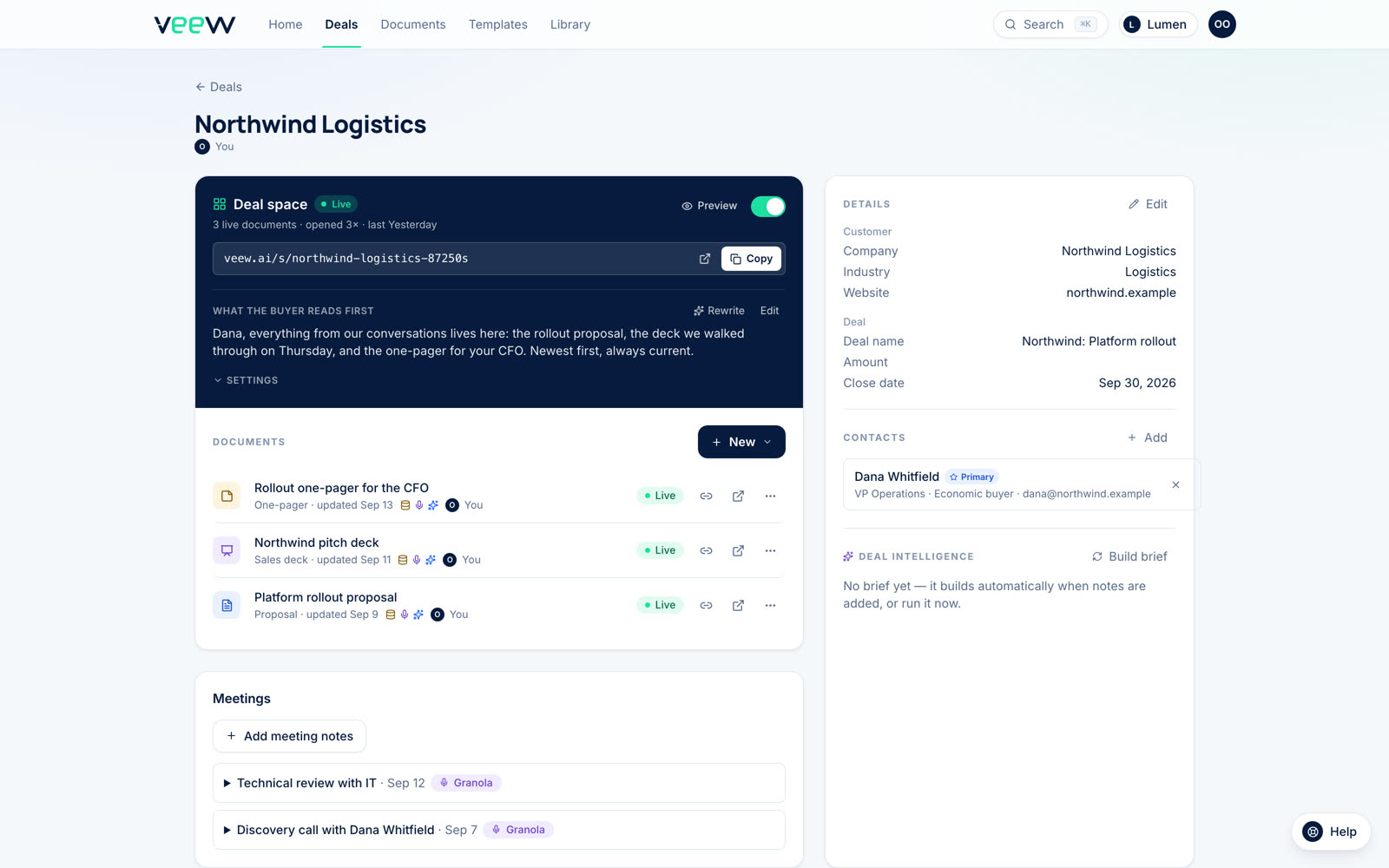
What lands in Veew
One deal, with everything HubSpot sent.
The real deal page: the synced contact, the meeting notes from your notetaker, every document published for the deal, and the buyer's link. Nothing to set up.
Built for HubSpot teams
Your deals are ready. Your proposals aren't: yet.
Start free and generate a proposal from one of your real HubSpot deals in minutes.
14-day Team trial, no card required.