
Veew + Attio
Attio proposal software that writes from the deal.
Your deal already knows the company, the person, and the number. Veew turns it into a personalized, on-brand Attio proposal or sales deck, and notes the engagement back on the deal.
Deal in, document out
From Attio deal to sent proposal in minutes.
- Company
- Northwind Logistics
- Contact
- Dana Whitfield, VP Operations
- Amount
- $48,000 · 120 seats
- Stage
- Proposal
Pick the deal
Search any deal by name or company: the company, associated person, value, and stage come with it. Standard and custom attributes map to your proposal fields.
AI writes for the prospect
The narrative is built from the deal and your discovery notes, laid out in your brand, citing your approved proof.
Activity flows back
Sends and accepts land as notes on the deal, and four Veew attributes keep the latest document, its status, and its reads in view.
Reads a little, writes less
Your data model stays yours.
Veew reads the attributes you map and writes only its own: a note in the deal timeline and four attributes on the deal. Value, stage, and your people are never touched. Nothing is installed in your workspace beyond the connection, and any admin can remove it from Attio's settings.
- OAuth 2.0 sign-in, revocable from your workspace's apps in Attio
- Map any standard or custom attribute on deals, companies, and people
- Your local edits survive a refresh from Attio
- Works on every Attio plan, the free one included
No plan requirement: the API is on every Attio tier.
Better together
Attio for the relationships. Your notetaker for the conversation.
Pair the Attio integration with Granola, Fathom, Fireflies, tl;dv, Avoma, or Read AI meeting notes and proposals reflect both the record and the conversation: the deal sets the frame, what the buyer said writes the story.
Set up in minutes
Connect Attio and draft from your first deal.
Turn on Deals in Attio
Attio ships with the Deals object switched off. A workspace admin turns it on under Workspace settings → Objects → Deals.
Connect Attio
In Veew, go to Settings → Integrations and click Connect Attio. Choose the workspace and approve the access; Attio notes the app hasn't been reviewed yet, which is expected until the App Store listing is approved. If you're an Attio admin, Veew adds its four deal attributes a moment later.
Map your fields
Veew starts you with the company's name and domain, plus the deal's name and value. Under Settings → Fields, pick any standard or custom deal, company, or person attribute for each Veew field, such as your own close date.
Import a deal and draft
Under Deals, click Import from Attio and search by deal or company name. The company, associated people, and mapped attributes come with it, and Veew writes the first draft of an AI sales proposal, deck, or one-pager for you to review.
Every screen, permission, and troubleshooting step: Attio: connect, import and write back.
Veew + Attio FAQ
How does Veew work with Attio?
Connect once with your Attio login, then pick any deal. The company, the associated people, and the deal attributes come into Veew automatically, the AI writes a proposal or deck for that prospect, and when the buyer acts on it Veew adds a note to the deal and keeps four "Veew" attributes on it current: the latest document, its status, when it was last read, and how many times.
What does Veew write to Attio?
A note on the deal when a document is sent, accepted, commented on by the buyer, or its form is answered, and its own four attributes on the deals object. It never edits value, stage, owner, companies, people, or any attribute you mapped. Veew creates the four attributes for you when the connecting user can change the workspace's objects; otherwise your admin adds them once and Veew picks them up by API slug.
What Attio data does Veew read?
The deal, its associated company, and its associated people: up to ten, with name, job title, and email. Which other attributes come across is up to you: standard and custom attributes on all three objects can be mapped to Veew fields under Settings → Fields. Attio's own data model shows through: a text, currency, select, status, date, or checkbox attribute maps to the matching Veew field type.
Do I need to enable anything in Attio first?
Yes: the Deals object. Attio ships with it switched off, and a workspace admin turns it on under Workspace settings → Objects → Deals. Companies and people are always on. Veew works on every Attio plan, the free one included.
Is Veew in the Attio App Store?
Veew connects through Attio's standard OAuth sign-in, the same way App Store apps do, and any workspace can connect it today. Until Attio has reviewed the listing you'll see a note on the consent screen that the app hasn't been approved yet; that's expected. Any admin can remove the connection from Attio's workspace settings at any time.
Which Veew plan do I need?
Connecting Attio and importing deals work on every Veew plan, Free included. Writing back to Attio, the notes and the four Veew attributes, is part of Starter ($19 a month) and Team ($39 per seat a month).
What about meeting notes?
Connect a notetaker (Granola, Fathom, Fireflies, tl;dv, Avoma, or Read AI) and each call's notes file themselves on the matching deal in Veew, so the proposal reflects both the Attio record and what was actually said.
- From call notes to proposal: what to do with the summary your notetaker just wrote
Fathom, Fireflies, Otter, Read AI, and Granola capture the call. Here's how to get from the summary to a proposal: what to extract, where it goes, and how to automate it.
What lands in Veew
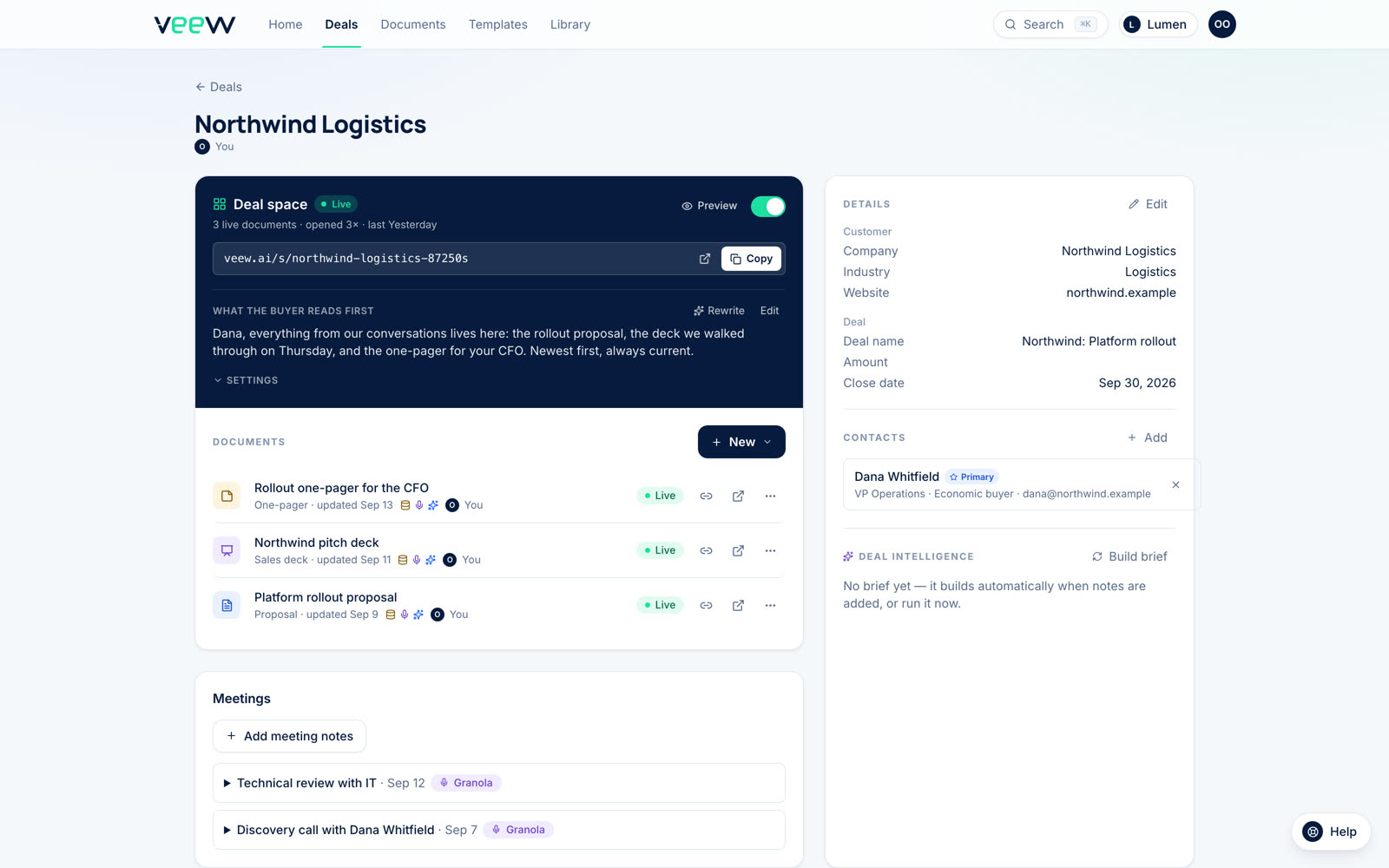
One deal, with everything Attio sent.
The real deal page: the synced contact, the meeting notes from your notetaker, every document published for the deal, and the buyer's link. Nothing to set up.
Built for Attio teams
Your deals are ready. Your proposals aren't: yet.
Start free and generate a proposal from one of your real Attio deals in minutes.
14-day Team trial, no card required.