
Veew + tl;dv
Your tl;dv notes, written into the proposal.
tl;dv recorded the call and wrote the notes. Veew takes your tl;dv notes the moment they're ready, puts them on the right deal, and turns what the buyer said into the proposal's narrative. Nothing to export, nothing to paste.
How it fits together
Recorded by tl;dv. Filed by Veew. Written from the call.
Every set of notes tl;dv finishes arrives in Veew on its own. Veew matches the call to a deal by who was on it, and if there is no deal yet it asks you, once, on Home. The next draft you start on that deal already knows what was said.
- “Manual reporting takes about six hours a week.”
- “We need the two warehouses on one system by Q4.”
- “Security review is the step that stalled last time.”
- Too much manual reportingRoughly six hours a week goes to pulling numbers by hand.
- Two warehouses, two systemsConsolidation by Q4 is the forcing deadline.
- Security review, handled earlyWe front-load the review that stalled the last rollout.
Arrives on its own
Connect once with your API key and point tl;dv at Veew. tl;dv says when the notes are ready; no exporting, no forwarding.
Lands on the right deal
Matched by the buyer's email and company. A call with nobody external on it is skipped, not filed.
Said becomes written
The topics, summaries, and notes from the call shape the executive summary and approach.
Why buyers notice
“They actually listened.”
A proposal that opens with the buyer's own priorities: the deadline they mentioned, the integration they asked about, the rollout they need, reads completely differently than one that opens with your company history.
- Executive summary anchored in their words
- Objections from the call addressed head-on
- The next steps, already in the document
Send it while it's warm
The best time to send a proposal is hours after the call, not next week. Veew makes same-day the default.
Notes only, and yours only
Veew asks tl;dv for the notes, never the recording or the transcript. Each person connects their own account, and only their calls come through.
Your tl;dv plan, Veew's free tier
tl;dv's API comes with its Pro and Business plans. Veew's side is free to start. Nothing to upgrade here to try it.
Pairs with your CRM
tl;dv brings what was said; HubSpot, Salesforce, Pipedrive, or Attio brings who, how much, and what stage. Together they give Veew the full picture of the deal.
Set up in minutes
Connect tl;dv and draft from your next call.
Generate a tl;dv API key
In tldv.io, open Settings → Personal settings → API keys, generate a key, and copy it right away. API keys need tl;dv's Pro or Business plan.
Connect it in Veew
In Veew, go to Settings → Integrations. tl;dv is under Your connections, because each person connects their own. Paste the key and choose Connect tl;dv. Your last 14 days of calls import, and the card shows a Webhook URL and an Authorization header.
Create the webhook in tl;dv
In tl;dv, open Settings → Webhooks and click Configure new webhook. Choose the MeetingReady event at the User level, paste the Webhook URL as the Endpoint URL, add a custom header named Authorization with the value from the Veew card, then save and activate. Skip this and Veew still checks every few minutes.
Draft from the call
Start a proposal, deck, or one-pager on the deal. The buyer's priorities, objections, and next steps from the notes shape the AI sales proposal, and the draft cites what it used so you can check every line before it goes out.
Every screen, permission, and troubleshooting step: Connect tl;dv and point it at Veew.
Veew + tl;dv FAQ
How does the tl;dv integration work?
Paste your tl;dv API key once, under Settings → Integrations, then create a webhook in tl;dv that points at the address Veew gives you. From then on, the moment tl;dv finishes a meeting's notes, Veew receives them, works out which deal the call belongs to from who was on it, and files the notes there. Calls Veew can't place wait in your inbox on Home for a one-click decision. Your last two weeks of calls come in when you connect.
Do I need a paid tl;dv plan?
Yes. tl;dv's API and webhooks are on its Pro and Business plans; there is no API on the free plan. Each person connects their own tl;dv account with their own key, because a key sees the meetings of the person who made it, and what it can read follows the plan of whoever organized the meeting.
What ends up in the proposal from my calls?
The substance, not the transcript. Veew reads tl;dv's AI notes, topic by topic, for the buyer's goals, pain points, and requirements, and writes the executive summary and approach around them. You review every draft before anything goes to a buyer.
Which calls does Veew take?
Only calls with someone from outside your company on them. Internal meetings are skipped, and Veew never reads your tl;dv recordings or transcripts: the notes are all it asks for.
Why do I create a webhook in tl;dv myself?
tl;dv has no way for an app to register itself for notifications, so you tell it where to send them: one address and one header, both shown on your Veew settings card once you connect, entered once in tl;dv under Settings → Webhooks. The header is how Veew knows a delivery really came from your tl;dv. Skip that step and Veew still checks for new notes every few minutes.
Do you support other notetakers?
Granola, Fathom, Fireflies, Avoma, and Read AI are connected the same way, and Fathom, Fireflies, and Read AI work on their free plans. Gong is on request. Tell us which you use at support@veew.ai. You can also paste notes in manually from any tool.
- From call notes to proposal: what to do with the summary your notetaker just wrote
Fathom, Fireflies, Otter, Read AI, and Granola capture the call. Here's how to get from the summary to a proposal: what to extract, where it goes, and how to automate it.
What lands in Veew
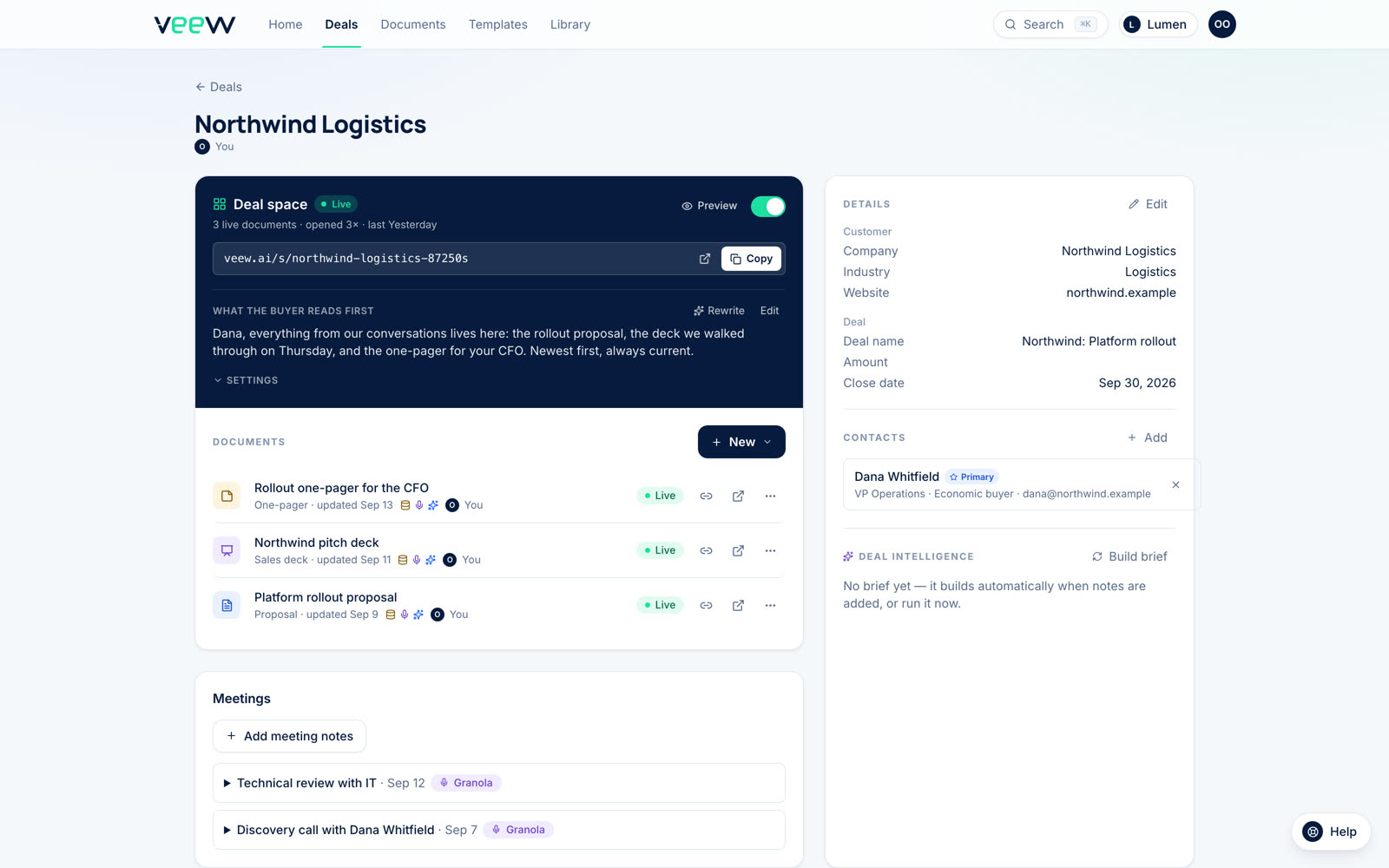
One deal, with everything tl;dv sent.
The real deal page: the synced contact, the meeting notes from your notetaker and the CRM record, every document published for the deal, and the buyer's link. Nothing to set up.
From the call to the close
Stop letting great discovery go to waste.
Start free: connect tl;dv in a couple of minutes and your next proposal starts from the conversation.
14-day Team trial, no card required.